YouTube is where the answers are — but watching a 40-minute video to get three minutes of useful information is a bad trade. VoxAI turns any YouTube video into text you can read, search, translate, and ask questions about, in seconds, without opening a second tab or waiting for anything to upload. It's a free Chrome extension. No account. No server. It runs entirely in your browser.
You've bookmarked more videos than you'll ever watch. A colleague sends a 90-minute conference talk and says "just skip to the good part," except nobody tells you where the good part is. You're studying for an exam and the lecture is in a language you're still learning. You want to know if a video is worth your time before you commit to it.
None of these are video problems. They're time problems. VoxAI treats video the way it should be treated when you're in a hurry: as text first, video second.
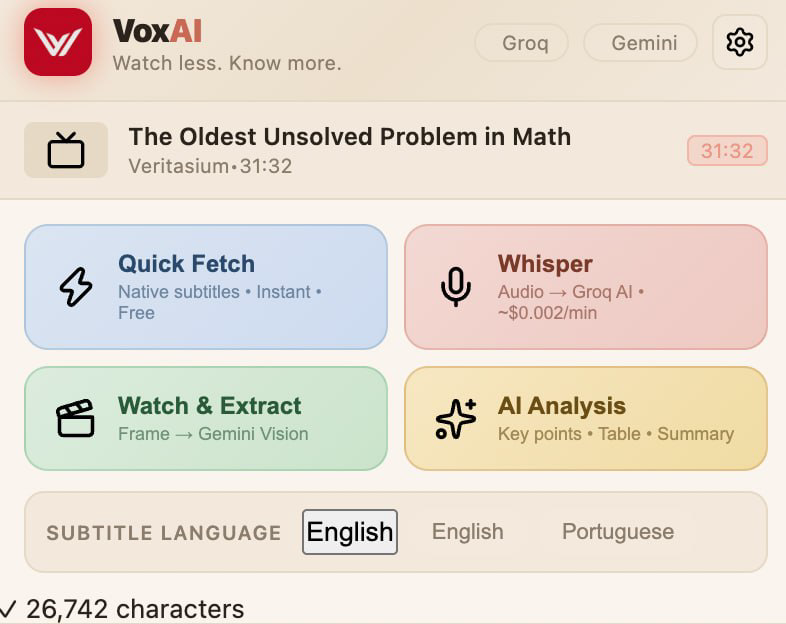
Most YouTube videos already have captions sitting on Google's servers, unused by almost everyone. VoxAI pulls them directly — no AI, no cost, no waiting. Click, and the full transcript is in front of you in under a second.
Some videos — old uploads, live streams, niche channels — were never captioned. For those, VoxAI sends the audio to Groq's Whisper model, one of the fastest speech-to-text engines available, and gets you a transcript for a fraction of a cent per minute.
Not everything worth knowing gets said out loud. A cooking video's technique, a product demo's UI, a tutorial's on-screen steps — these live in the picture, not the audio. VoxAI can hand the video directly to Google's Gemini model, which watches it and describes what's actually happening, not just what's said.
A raw transcript is still a lot to read. One click runs it through AI analysis and gives you back what you actually wanted: the key points, the useful numbers pulled into a table, the parts worth acting on. You can rewrite the analysis prompt yourself if you want something more specific — a study guide, an executive brief, a three-line summary — and VoxAI remembers your version.
If the video is in a language you don't speak fluently, translate the transcript with one click. It's still the same content, just readable.
Already have a favorite AI tool? One click copies the transcript and video details to your clipboard and opens ChatGPT, Claude, Gemini, DeepSeek, Perplexity, or NotebookLM in a new tab, ready to paste. You can add your own tools too.
Open the same video twice and VoxAI won't waste your API quota re-transcribing or re-analyzing something it already has an answer for. It's saved, instantly available, and automatically clears out after 30 days so nothing piles up.
Open any YouTube video.
Click the VoxAI icon in your browser toolbar.
Click Quick Fetch for an instant transcript, or Whisper if the video has no captions.
Translate it, run AI Analysis, or send it to the AI tool you already use — whichever you need.
That's the whole workflow. No setup beyond adding your own free API key the first time.
VoxAI doesn't run its own server. Every request — to Groq, to Gemini, to whichever AI you choose — goes straight from your browser using your own API key, which stays stored locally on your device and nowhere else. Nobody in the middle sees your videos, your transcripts, or your questions. That's not a feature bolted on for marketing; it's the only way the extension is built.